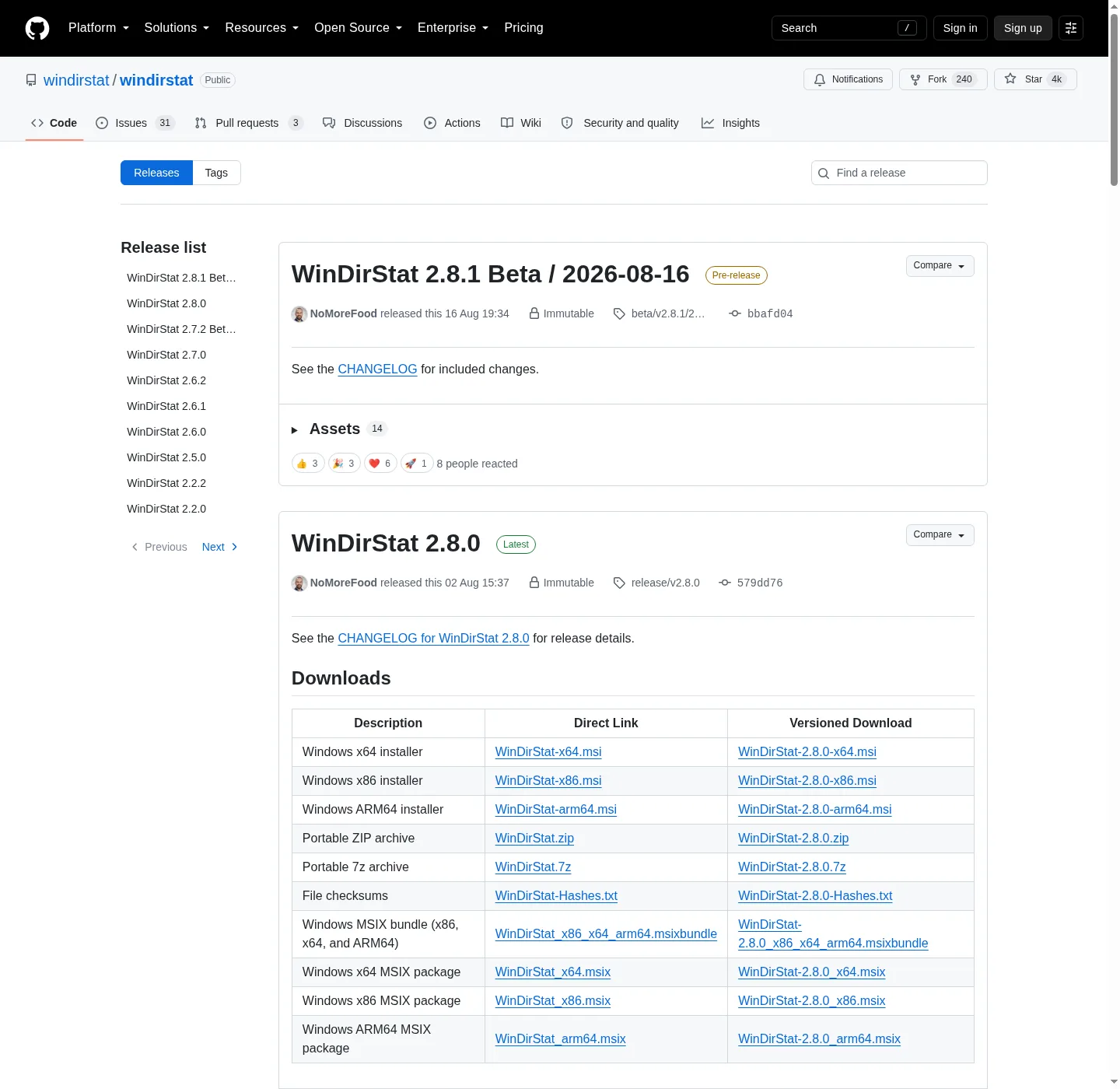
MSI versus zip versus 7z versus MSIX
WinDirStat ships Windows payloads on GitHub Releases: architecture-specific MSI installers, two portable archives, and Store-style MSIX files. Public copy still says the current release. Latest/download URLs omit the tag, for example WinDirStat-x64.msi under /releases/latest/download/.
Winget does not install the zip. It wraps the MSI for id WinDirStat.WinDirStat:
winget install -e --id WinDirStat.WinDirStatRelated: install on Windows, winget command, open source disk space analyzer releases, and disk space analyzer for this computer.
Default x64 MSI
The README says: if you are not sure which file to choose, download the 64-bit MSI installer. That file is WinDirStat-x64.msi. It is the standard Windows installer for Intel or AMD 64-bit PCs. It adds WinDirStat to the Start menu and installs it like a normal app. Winget metadata puts that family at %ProgramFiles%\WinDirStat on x64.
WiX is the installer type in winget-pkgs. Scope is machine. Interactive, silent, and silentWithProgress are listed as install modes. Daily users double-click the MSI or run winget. People who already know msiexec can use it. These notes do not invent extra MSI properties the README does not print.
No .NET runtime is named in the README. The app is native C++. You do not install a desktop runtime as a second step after this MSI.
ARM64 and x86 MSI siblings
WinDirStat-arm64.msi is the standard installer built for ARM64 Windows, including newer Surface devices and other Snapdragon-based laptops. Default install location in winget metadata is still %ProgramFiles%\WinDirStat. Mixing an x64 MSI onto an ARM64 PC is how people get a launch that feels wrong. Match the file to the CPU.
WinDirStat-x86.msi is the 32-bit installer. Default location in winget metadata is %ProgramFiles(x86)%\WinDirStat. Take it only when the PC is 32-bit x86. On a normal 64-bit desktop, stay on the x64 MSI.
All three MSI names sit on the same GitHub tag. There is no reason to hunt an older numbered filename on a third-party page. GitHub latest/download links in the README omit the tag on purpose so public copy never pins a number.
Portable zip and 7z
WinDirStat.zip is for portable use, testing, or running without an installer. Extract it first, then run the executable for your CPU type. WinDirStat.7z is the same kind of portable executable archive, usually with a smaller download size, when you already have 7-Zip.
README names portable settings. A portable folder is a good fit when you want the app next to a USB work tree, or when you cannot run a machine-scope MSI. It is a worse fit when you want Start menu registration and winget upgrade. Winget will not keep a loose zip folder updated. You replace the folder yourself from the current release.
Do not treat the zip as a second product. It is the same WinDirStat tree in archive form. After extract, pick the exe that matches x64, x86, or ARM64. If two exes sit in the folder, run one.
MSIX and the Store listing
If the release includes WinDirStat_x86_x64_arm64.msixbundle, it can contain packages for multiple CPU types and Windows chooses the right package. Per-arch files WinDirStat_x64.msix, WinDirStat_x86.msix, and WinDirStat_arm64.msix are supporting. These notes do not make MSIX the default take.
Microsoft Store listing id 9ph1gl95p3wf is the README first install bullet, for Store-managed installation and updates. Chocolatey: choco install windirstat. Scoop: scoop install extras/windirstat after scoop bucket add extras. Supporting only. The command of record stays the winget line above.
File chooser
| File | Role | Run it? |
|---|---|---|
WinDirStat-x64.msi | Default 64-bit installer | Yes, on x64 Windows |
WinDirStat-arm64.msi | ARM64 installer | Yes, on ARM64 Windows |
WinDirStat-x86.msi | 32-bit installer | Yes, on x86 Windows |
WinDirStat.zip | Portable zip | Extract, then run the matching exe |
WinDirStat.7z | Portable 7z | Extract, then run the matching exe |
| MSIX / msixbundle | Store-style packages | Supporting |
WinDirStat-Hashes.txt | Checksums | Compare hashes. Do not install it. |
| Debug symbols | Developer symbols | Skip for daily use |
| Source zip or tarball | GitHub automatic source | Skip as the daily install |
Safe-download framing: download a disk space analyzer safely. Trust notes: is this disk space analyzer safe. Repo: open source disk space analyzer on GitHub. Product home: windirstat.net.
Supporting package managers
README recommended path is a package manager, because updates are easier. Winget is the mapped command. Store, Chocolatey, and Scoop are named next to it. Pick one manager. A Store install plus a GitHub MSI plus a zip folder is three copies of the same viewer.
Scoop needs the extras bucket first. Chocolatey uses choco upgrade windirstat later, per the README. Store updates through the Store. None of those replace the GitHub file list when you want a portable 7z.
Pick one copy
Hashes on each tag live in WinDirStat-Hashes.txt. Compare the file you downloaded against that list. The hashes file is not an installer and not a portable app. Debug symbol archives are for people who already build or debug. Skip them on a normal PC.
A USB work folder is the usual reason to take zip or 7z. Keep the extract on media you control. Do not unpack into C:\Windows or into a download portal directory that a browser helper still owns. After you finish a scan, you can delete the folder. MSI and winget copies uninstall through Apps settings instead.
Installed MSI and winget share Program Files. Portable zip lives wherever you extracted it. MSIX and Store are another install shape. Keep one. After you pick, scan a folder: find large files. Read the treemap: read the treemap. Cleanup: cleanup from a scan.
Compatibility in the README covers Windows 7 through 11 and the Server list through 2025. Portable archives still need a Windows PC. There is no Mac or Linux binary on this tag. Home: disk space analyzer. Guides: guides. About: about. Move off Explorer Properties: move off Explorer.
Frequently asked questions
Should I use the portable zip or the MSI?
Use WinDirStat-x64.msi, or winget, when you want a Start-menu install in Program Files. Use WinDirStat.zip or WinDirStat.7z when you want a folder you can move. Both sit on GitHub Releases.
Does winget install the portable archive?
No. Winget wraps the WiX MSI for id WinDirStat.WinDirStat. Portable is a zip or 7z on the same GitHub tag. Command: winget command. Setup path: install on Windows.
Which MSI do I take on ARM64?
Take WinDirStat-arm64.msi on ARM64 Windows, including newer Surface devices and Snapdragon laptops. Default on Intel or AMD 64-bit PCs is WinDirStat-x64.msi. Take WinDirStat-x86.msi on 32-bit Windows.
Is the portable zip the same app?
Yes. The README says the zip contains the executables. Extract it, then run the executable for your CPU type. The 7z archive is the same kind of portable payload, usually smaller.
What is the Microsoft Store listing?
README first install bullet is Microsoft Store id 9ph1gl95p3wf for Store-managed installation and updates. GitHub Releases and winget remain the two paths these notes map. Pick one door so you do not stack copies.