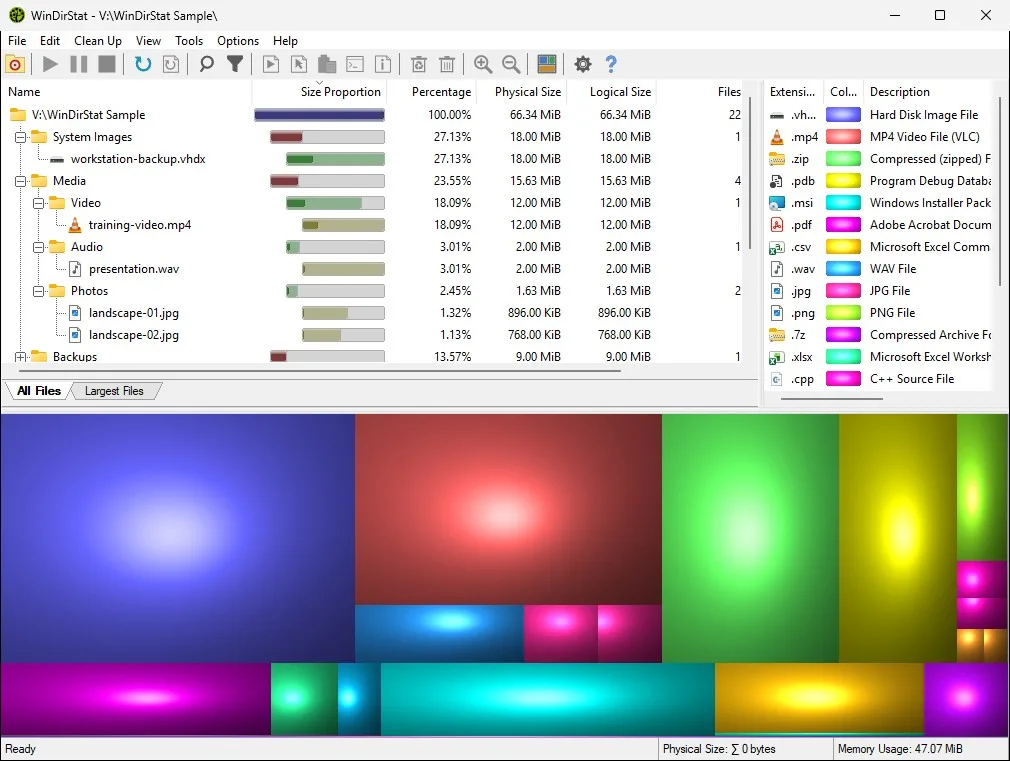
Treemap freeware versus GPL-2.0
SpaceSniffer versus WinDirStat is a license split on a shared picture: boxes sized by file and folder weight. SpaceSniffer is Uderzo Software treemap freeware. WinDirStat is GPL-2.0 on windirstat/windirstat, with MSI files on GitHub Releases and winget id WinDirStat.WinDirStat.
People search both names after a drive fills. One of those jobs is a freeware treemap. The other is an open-source statistics viewer plus cleanup tool. Related: guides, disk space analyzer, vs TreeSize, and vs WizTree.
Install the GPL app:
winget install -e --id WinDirStat.WinDirStatWhat SpaceSniffer is
Uderzo publishes SpaceSniffer as Windows freeware with a treemap. Read the vendor page for how that product filters, zooms, and exports. These notes do not rewrite that manual. Freeware is not the same as GPL-2.0 source on GitHub. Keep SpaceSniffer downloads on the Uderzo site.
Do not take a SpaceSniffer build from a WinDirStat tag. Do not take a WinDirStat MSI from a random treemap mirror. Each product has a home. For WinDirStat that home is GitHub Releases, the package managers the README lists, and links from windirstat.net.
What this project is
WinDirStat is a disk usage statistics viewer and cleanup assistant for Microsoft Windows. It scans local drives, selected drives, folders, and command-line targets. Views named in the README: All Files, Largest Files, Duplicate Files, Search Results, File Watcher, Extension, and Treemap. The treemap supports zooming, parent/child reselection, extension labels, logical or physical sizing, and configurable KDirStat or SequoiaView styling.
Search and filters include regular expressions, path/name filters, size filters, and reparse-point exclusions. Duplicate detection uses configurable hash algorithms, with cloud-file safeguards and hardlink deduplication named in the README. CSV scan import/export and duplicate CSV export are there. Cleanup can delete to the Recycle Bin and jump to Windows Disk Cleanup.
No account. Native C++. No .NET runtime named in the README. Compatibility: Windows 7 through 11 and the Server list through 2025. Default file: WinDirStat-x64.msi. Portable: WinDirStat.zip / WinDirStat.7z.
Walkthroughs: read the treemap, find large files, duplicate files by hash, cleanup from a scan.
Feature table
| Topic | WinDirStat | SpaceSniffer |
|---|---|---|
| Vendor | The WinDirStat Team | Uderzo Software |
| License | GPL-2.0 | Freeware on the vendor site |
| Source on GitHub | Yes, windirstat/windirstat | Not this GPL-2.0 tree |
| Windows install | Winget, GitHub MSI, Store, portable zip/7z | Uderzo download for that product |
| Treemap | Yes | Yes, that is the product picture |
| Directory list | Yes | Follow Uderzo docs for that product |
| Extension list | Yes | Follow Uderzo docs for that product |
| Duplicate by hash | Yes, configurable algorithms | Follow Uderzo docs for that product |
| Cleanup shortcuts | Recycle Bin, Disk Cleanup, user-defined actions | Follow Uderzo docs for that product |
| Account | None | Follow the vendor for that product |
| Importer from the other tool | None documented | None documented here |
TreeSize Free is the Jam Software edition split: vs TreeSize. WizTree is the MFT-first scanner: vs WizTree. Explorer Properties is the slow total: switch from folder Properties.
When to keep SpaceSniffer
Treemap styling in WinDirStat is configurable as KDirStat or SequoiaView styling. Zoom, parent reselection, and extension labels are named in the README. If a treemap looks like one color, open the extension list. One type often owns the drive. That is a reading habit, not a reason to keep a second freeware copy forever.
SpaceSniffer still has a place if you like dragging a filter over the map in that UI. WinDirStat’s search, regular expressions, size filters, and reparse-point exclusions cover a different filter set. Try one scan on a folder you can waste before you decide. Do not delete Windows folders from either treemap as a first click.
Portable WinDirStat.zip sits on the same GitHub tag as the MSI. SpaceSniffer’s own portable habits stay on the Uderzo page. Two portable folders on a USB stick are two products. Label them. Run one when you mean one.
Hashes for WinDirStat live in WinDirStat-Hashes.txt on the GitHub tag. Compare the MSI or zip you took. Unofficial treemap wrappers that reuse the WinDirStat name are the README malware warning, not SpaceSniffer. Stay on GitHub or winget for this project, and on uderzo.com for SpaceSniffer.
Keep SpaceSniffer when that freeware treemap is already muscle memory, or when a filter habit in that app is the whole job. Read Uderzo for that product. These notes do not invent a converter that paints a SpaceSniffer view inside WinDirStat.
If you only opened SpaceSniffer because search mixed “treemap” with every scanner name, look at the job. A treemap plus an extension list plus hash duplicates is the WinDirStat README feature set. A dedicated freeware treemap is SpaceSniffer.
When to switch
Switch to WinDirStat when you want GPL-2.0, a machine-scope MSI, winget upgrades, hashes on GitHub, and cleanup actions that include Recycle Bin and Disk Cleanup. Re-scan the drive. Do not hunt a SpaceSniffer project file. WinDirStat can save and reload its own scans, including CSV import/export.
Install: install on Windows. Winget: winget command. Portable: portable or MSI. Releases: open source disk space analyzer releases. GitHub: open source disk space analyzer on GitHub. Safe path: download safely.
How to install this project
Run the winget command on Windows 10 1809+ or Windows 11, or take WinDirStat-x64.msi. ARM64 MSI is WinDirStat-arm64.msi. x86 MSI is WinDirStat-x86.msi. Store listing 9ph1gl95p3wf, Chocolatey, and Scoop are supporting. Product homepage: windirstat.net. License: LICENSE.md. README: project README.
After the first scan, zoom the treemap rather than guessing from color alone. Colors track extensions. A drive that looks like one block is often one file type eating the volume. About: about. This computer: disk space analyzer for this computer. Disk analyzer: disk analyzer. Check storage: check storage on a PC. Move off Explorer: move off Explorer.
Frequently asked questions
Is SpaceSniffer the same as this disk space analyzer?
No. SpaceSniffer is Uderzo Software treemap freeware. WinDirStat is GPL-2.0 on GitHub. Vendor: SpaceSniffer.
Is SpaceSniffer open source like this disk space analyzer?
WinDirStat is GPL-2.0. SpaceSniffer is freeware on the Uderzo site. Treat that site as the vendor page for that product. Do not mix the two licenses.
Can I import SpaceSniffer views into this disk space analyzer?
The WinDirStat README does not document a SpaceSniffer importer. Scan the same folder again in WinDirStat. Keep SpaceSniffer when you still want that freeware treemap.
Which should I use for a treemap?
Use WinDirStat when you want a directory list, extension list, and treemap together, plus duplicate hashes and cleanup shortcuts. Keep SpaceSniffer when you already live in that freeware treemap. Pick on the job, not a rank.
How do I install this disk space analyzer instead of SpaceSniffer?
Run winget install -e --id WinDirStat.WinDirStat or take WinDirStat-x64.msi from GitHub Releases. Guide: install on Windows.