Two Windows scanners, two licenses
TreeSize versus WinDirStat is a license and product split on top of a similar job: see which folders ate a Windows drive. TreeSize Free is a Jam Software edition. TreeSize Professional is the paid edition on the same vendor. WinDirStat is GPL-2.0, source on windirstat/windirstat, files on GitHub Releases, winget id WinDirStat.WinDirStat.
Official WinDirStat files stay on GitHub and the package managers the README lists. TreeSize files stay on jam-software.com. Related: guides, disk space analyzer, vs WizTree, and vs SpaceSniffer.
Install the GPL app:
winget install -e --id WinDirStat.WinDirStatWhat TreeSize Free is
Jam Software markets TreeSize Free as a Windows size scanner. The vendor also sells TreeSize Professional. Edition names and paid terms live on the vendor site. These notes do not invent a dollar figure. If a roundup quotes a price, open jam-software.com and read the edition page that is live today.
TreeSize is not the WinDirStat project. It is not GPL-2.0 on this GitHub repo. Keep each vendor’s download on that vendor’s site. Do not fetch TreeSize from a WinDirStat tag, and do not fetch WinDirStat from a TreeSize mirror.
People type both names when Explorer folder Properties sat on 100% for minutes and they want a tree of sizes. That job is real. The products still differ on license, treemap, duplicate hashing, and cleanup shortcuts.
What this project is
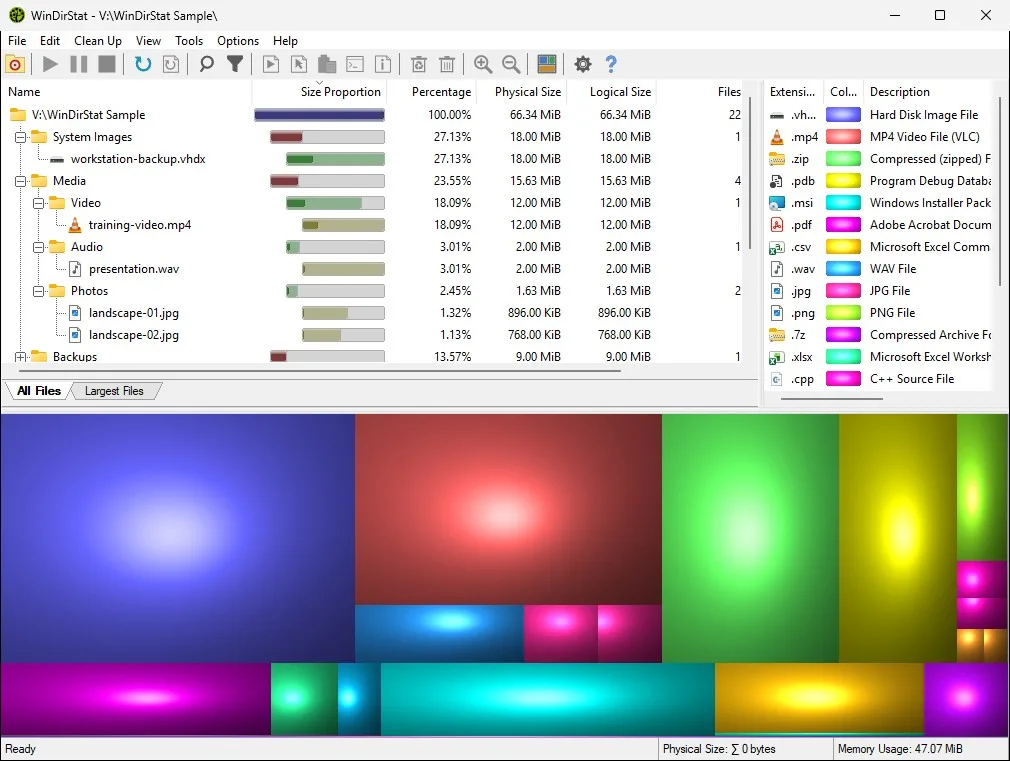
WinDirStat scans local drives, selected drives, individual folders, and command-line targets. After the walk it shows a sortable directory tree, an extension/type breakdown, and an interactive treemap. Larger files and folders take larger areas. README views also include All Files, Largest Files, Duplicate Files, Search Results, and File Watcher.
Duplicate detection is by hash, with configurable hash algorithms. Cleanup actions can open items, copy paths, select in Explorer, invoke the Explorer context menu, open Command Prompt or PowerShell, move files, show properties, delete files, and empty folders or the Recycle Bin. Windows maintenance shortcuts include Disk Cleanup, Programs and Features, DISM, shadow copies, defrag, CHKDSK, and more named in the README.
License is GPL v2 for the application, not later. Logo and derivatives: CC BY 3.0. No account. No paid tier in the README. Native C++ Windows app. Compatibility lists Windows 7 through 11 and Windows Server 2008 R2 through 2025.
Reading the treemap: read the treemap. Large files: find large files. Duplicates: duplicate files by hash. Cleanup: cleanup from a scan.
Feature table
| Topic | WinDirStat | TreeSize |
|---|---|---|
| Vendor | The WinDirStat Team | Jam Software |
| License | GPL-2.0 (application GPL v2, not later) | Free edition plus paid Professional on the vendor site |
| Source | GitHub windirstat/windirstat | Closed product on jam-software.com |
| Windows install | Winget, GitHub MSI, Store, choco, scoop, portable zip/7z | Jam Software download for that product |
| Treemap | Yes, KDirStat or SequoiaView styling in the README | Follow Jam Software docs for that product |
| Extension list | Yes | Follow Jam Software docs for that product |
| Duplicate detection | By hash, configurable algorithms | Follow Jam Software docs for that product |
| Cleanup | Recycle Bin, Disk Cleanup shortcut, user-defined actions | Follow Jam Software docs for that product |
| Account | None | Follow the vendor for that product |
| Paid tier | None in the README | Professional edition on the vendor site |
| Importer from the other tool | None documented | None documented here |
WizTree is a third scanner, MFT-first, freeware with a paid supporter path: vs WizTree. SpaceSniffer is treemap freeware from Uderzo: vs SpaceSniffer. Explorer Properties is the built-in total: switch from folder Properties.
When to keep TreeSize
Jam Software also documents its own export and report habits on the vendor site. If you already print a TreeSize list to CSV for a ticket, keep doing that in TreeSize. WinDirStat CSV is a scan record for WinDirStat. Mixing the two files in one spreadsheet is fine as notes. It is not an installer path and not a documented import.
Winget will not install TreeSize under id WinDirStat.WinDirStat. That id is this project only. TreeSize stays on jam-software.com. If a catalog search shows both names, read the publisher field before you hit install.
Keep TreeSize when you already live in Jam Software tooling, or when a Professional edition feature on the vendor site is the reason you paid. Read Jam Software for that product. These notes do not migrate a TreeSize export into WinDirStat.
If the job is a size tree you already trust in TreeSize Free, you can stay there. A second scanner is optional. Running both at once on the same drive is extra load, not a requirement.
When to switch
Switch to WinDirStat when you want GPL-2.0 source, a GitHub MSI, winget id WinDirStat.WinDirStat, a treemap plus extension list in one local window, duplicate hashes, and the cleanup shortcuts the README names. Scan the folder again. Export nothing from TreeSize unless you already have a CSV you want to keep as a spreadsheet, not as an importer.
Home install: disk space analyzer. Windows walk: install on Windows. Winget: winget command. Releases: open source disk space analyzer releases. GitHub: open source disk space analyzer on GitHub. Safe download: download safely. This computer: disk space analyzer for this computer.
How to install this project
Use winget on Windows 10 1809+ or Windows 11, or take WinDirStat-x64.msi from Releases. ARM64 and x86 MSI files sit on the same tag. Portable zip and 7z are the other official files: portable or MSI. Store id 9ph1gl95p3wf is supporting. Product homepage: windirstat.net. License: LICENSE.md.
After install, pick the same folder TreeSize was showing. Wait for the directory list and treemap. Then decide what to delete with cleanup from a scan, and do not wipe Windows folders blindly. About: about. Disk analyzer: disk analyzer. Check storage: check storage on a PC. Move off Explorer: move off Explorer.
Frequently asked questions
Is TreeSize the same as this disk space analyzer?
No. TreeSize Free and TreeSize Professional are Jam Software products. WinDirStat is GPL-2.0 on GitHub. Two vendors, two licenses. Vendor: TreeSize Free.
Is TreeSize free?
Jam Software publishes a free edition and a paid TreeSize Professional edition on the vendor site. Check that site for current edition names. Do not treat a blog price as a quote. WinDirStat has no paid tier in the README.
Can I import TreeSize lists into this disk space analyzer?
The WinDirStat README does not document a TreeSize importer. Scan the same folder again in WinDirStat. CSV scan import/export exists for WinDirStat's own scans, not as a TreeSize converter.
How do I install this disk space analyzer instead of TreeSize?
Run winget install -e --id WinDirStat.WinDirStat or take WinDirStat-x64.msi from GitHub Releases. Guide: install on Windows.
Should I compare WizTree here too?
WizTree is a separate Windows NTFS scanner. That comparison lives on vs WizTree. This note stays on TreeSize Free versus WinDirStat.