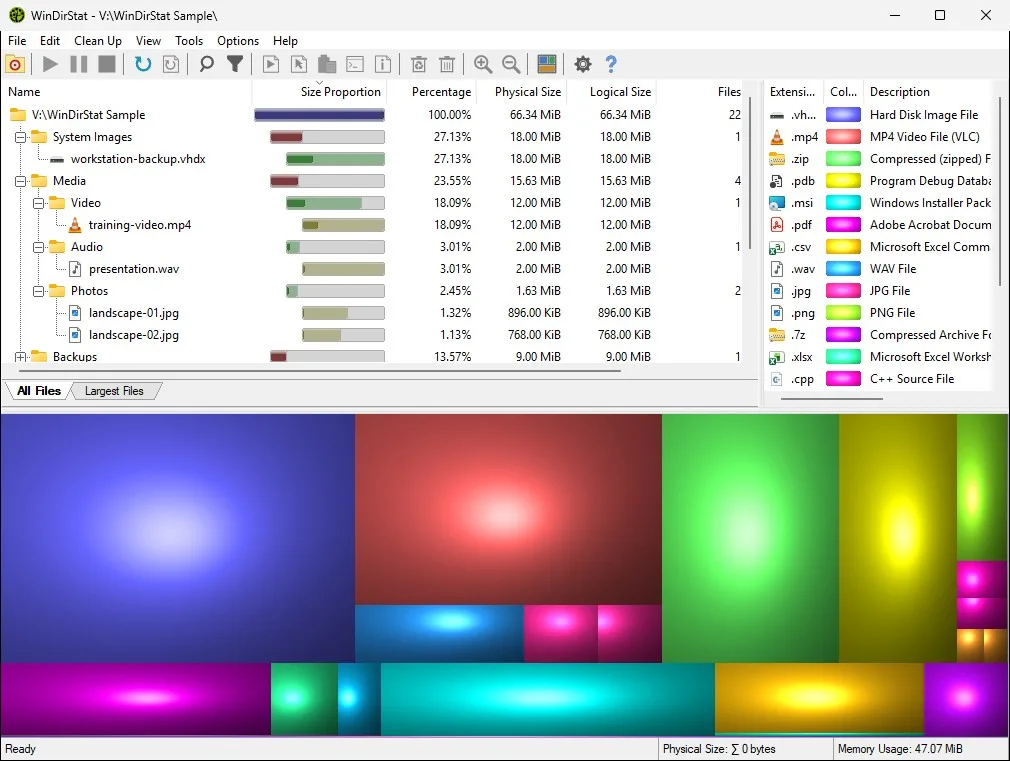
Start with the machine in front of you. If the goal is to run the Windows scanner today, use an install path. If the goal is to decide between this project and WizTree, TreeSize, or SpaceSniffer, use a compare guide. If the goal is to stop relying on Explorer folder Properties, use the migrate notes. If the goal is one job such as reading the treemap, use a howto. Home keeps the command at home.
When a guide names a command, that command was checked against microsoft/winget-pkgs and the WinDirStat README on 2026-09-02. Release numbers are not typed here. The current release is on the stamp. If a filename on GitHub Releases does not match the pattern in releases, wait and read the official list. If a search result wants a helper that copies the project name, stop and use download safely instead. Official site: windirstat.net.
How to pick a guide
Name the operating system and the next action in one sentence. Install on this Windows PC. See how this project differs from WizTree. Stop using only folder Properties. Read a treemap. If you can say that sentence, open the matching URL below. If you cannot, read the section intros, then pick the shortest match. One official channel is enough. Mixing winget and a portable folder on the same PC is how two copies fight.
A useful second test: is the job a Windows Storage category, a folder Properties total, or types and rectangles. Storage categories stay in Settings. Properties is a number. Types and rectangles are this project. Compare guides say that without inventing a rank.
Keep these URLs indexed
These paths already exist and stay indexed. They cover the daily command, GitHub, a safe fetch, winget, WizTree, Storage settings, and the shorter treemap job.
- Home, definition, winget command, Windows steps.
- Releases, which MSI or portable archive to take.
- GitHub, repo windirstat/windirstat, GPL-2.0.
- Download safely, GitHub, winget, Store, windirstat.net.
- How to install winget, App Installer, then the package id.
- Versus WizTree, GPL treemap versus Antibody Software freeware.
- Check storage on a PC, Storage settings versus a local scan.
- Disk analyzer, treemap and extension list job.
winget install -e --id WinDirStat.WinDirStatInstall, compare, migrate, and howto
Each title is its own URL. Install guides assume Windows. Compare guides link the vendor site they checked on 2026-09-02. Migrate means scan the same folder you used to measure in Properties. Howto pages walk one job.
- Install on Windows
- Install with winget
- Portable or MSI
- Versus TreeSize
- Versus SpaceSniffer
- Switch from folder Properties
- Is it safe
- Read the treemap
- Find large files
- Duplicate files by hash
- Cleanup from a scan
Related install notes
Supporting URLs sit beside that list. Releases answers which file. This computer is the requirements map. Explorer Properties is the migrate path. Legal pages are separate.
| If you have | Open | Official path |
|---|---|---|
| A Windows 10 or 11 PC | Windows install or winget | winget id, or x64 MSI from GitHub |
| A choice between zip and MSI | portable or MSI | x64 MSI is the default take |
| WizTree already installed | versus WizTree | diskanalyzer.com for WizTree; winget for this project |
| Need the current asset name | releases | x64 MSI, portable zip, ARM64, hashes file |
| This computer, mixed questions | this computer | Windows list, App Installer, architecture |
| Only used folder Properties | off Explorer Properties | Scan the same folder after install |
Publisher notes: about. Editorial practice: editorial policy. Contact, privacy, and advertising disclosure complete the legal set.
Commands those guides share
Windows install is one line. GitHub Releases is the file host for the same product. The README does not list brew, snap, flatpak, apt, Docker, Mac, or Android packages. These notes do not add unofficial install slugs for those. After install, first hour is a short scan of a throwaway folder, then a read of the treemap. Treemap, large files, duplicates, and cleanup have their own howtos. Portable versus MSI sits on its own URL.
Official homepage remains windirstat.net. Files still come from GitHub. Issues: WinDirStat issues.
Install by operating system
Step-by-step Windows installs with the winget command or GitHub MSI.
- Install on Windows Install a free disk space analyzer on Windows with the official winget command or the GitHub x64 MSI. Native C++, GPL-2.0, current release.
- Winget command Use the official winget command to install this Windows disk space analyzer. WiX MSI, machine scope, GitHub installer URLs, current release.
- Portable or MSI Pick the Windows disk space analyzer MSI, portable zip, 7z, or MSIX on GitHub Releases. Winget wraps the WiX MSI. Store and choco are supporting.
Comparisons
This app against the other tools people ask about.
- vs TreeSize Compare this free GPL-2.0 disk space analyzer with Jam Software TreeSize Free and the paid TreeSize Professional edition on the vendor site.
- vs SpaceSniffer Compare this GPL-2.0 disk space analyzer and GitHub MSI with Uderzo SpaceSniffer, a Windows treemap freeware tool on the vendor site.
Switch and import
Move off Explorer folder Properties onto a local scan.
Setup and security
Treemap, large files, duplicates, cleanup, and safety.
- Is it safe Fetch this Windows disk space analyzer from GitHub or winget. Match the hashes file, skip unofficial sites, and follow the README malware warning.
- Read the treemap Read the directory list, treemap, and extension list after a Windows disk space analyzer scan. Zoom, reselect parents, and switch logical or physical size.
- Find large files Scan a folder or drive with this Windows disk space analyzer, then use Largest Files, size sort, and the treemap to locate the heaviest objects.
- Duplicate hashes Detect duplicate files by hash in this Windows disk space analyzer. Algorithms are configurable. Export a duplicate CSV after the scan groups matches.
- Cleanup from scan Clean up from a disk space analyzer scan using Recycle Bin, Disk Cleanup, and README actions. Do not delete Windows folders blindly.
Frequently asked questions
Where should I start with these guides?
Install on Windows if the PC is in front of you. Compare vs WizTree if you already use that freeware scanner. Download-safe if a search result looks like a wrapper. Home keeps the winget command.
Are these guides a second download?
No. They are install and compare notes. The app still comes from GitHub Releases or winget id WinDirStat.WinDirStat.
Do the guides cover Mac or Linux?
No. Assets on the current GitHub tag are Windows MSI, zip, 7z, and MSIX. README points at windirstat.net for alternative versions on other operating systems. Stay on the Windows paths above.